MasterSQL is a free, browser-based MySQL practice environment built for anyone who wants to learn, teach, or sharpen their SQL skills without installing software or setting up databases. It runs real MySQL 8.4 syntax, resets to a clean slate every time you visit, and guides beginners through a structured 23-stage curriculum that covers everything from basic SELECT statements to stored procedures and triggers.
No signup. No credit card. No localhost configuration. Open the site, start typing queries, and get results instantly.
Why SQL Practice Matters
SQL is the most widely used database language in the world. Whether you are building a web application, analyzing business data, or preparing for a technical interview, you will almost certainly work with a relational database at some point. The problem is not a shortage of learning resources. The problem is that most people never get enough hands-on practice.
Reading a SQL tutorial is not the same as writing queries. Watching a video about JOINs is not the same as debugging a three-table join that returns the wrong rows. The gap between understanding a concept and applying it under pressure is where most learners get stuck.
MasterSQL exists to close that gap. It gives you a real MySQL environment in your browser, a structured path to follow, and instant feedback on every query you write.
What MasterSQL Offers
A Real MySQL Environment
MasterSQL runs MySQL 8.4, the latest long-term support release. This is not a simplified SQL dialect that looks like MySQL but behaves differently. It is the real thing. The syntax you learn on MasterSQL works identically in production MySQL installations. CREATE TABLE, ALTER TABLE, JOIN, SUBQUERIES, VIEWS, STORED PROCEDURES, TRIGGERS, and EXPLAIN all behave exactly as they do in a real MySQL server.
When you write a query on MasterSQL, it executes against a live MySQL instance. You see the actual rows returned, the actual error messages when something goes wrong, and the actual execution plan when you run EXPLAIN. There is no simulation layer between your code and the database.
Per-Session Isolation
Every time you open MasterSQL, you start with a fresh environment. Previous data, tables, and changes are gone. This is intentional. It means you never inherit someone else's mistakes, and you never have to clean up before starting a new exercise. Each session is completely isolated from every other session.
This also means you can experiment freely. Drop a table, rename a column, insert bad data, and see what happens. Your next session starts clean, so there are no consequences to exploration. Learning SQL requires experimentation, and MasterSQL removes the friction from that process.
A Structured Learning Path
The tutorial system at MasterSQL consists of 23 stages that build on each other progressively. Each stage introduces a new concept, explains it clearly, and gives you hands-on exercises to practice it. The early stages cover fundamentals like data types, primary keys, and basic queries. Later stages tackle more advanced topics like window functions, stored procedures, and database normalization.
The tutorials are designed around a single project: building a complete school database. By the time you finish all 23 stages, you will have created a working database with students, teachers, courses, enrollments, grades, and scheduling. Each stage adds one layer to this system, so you see how real databases are built in practice rather than learning isolated concepts in a vacuum.
An Interactive Query Playground
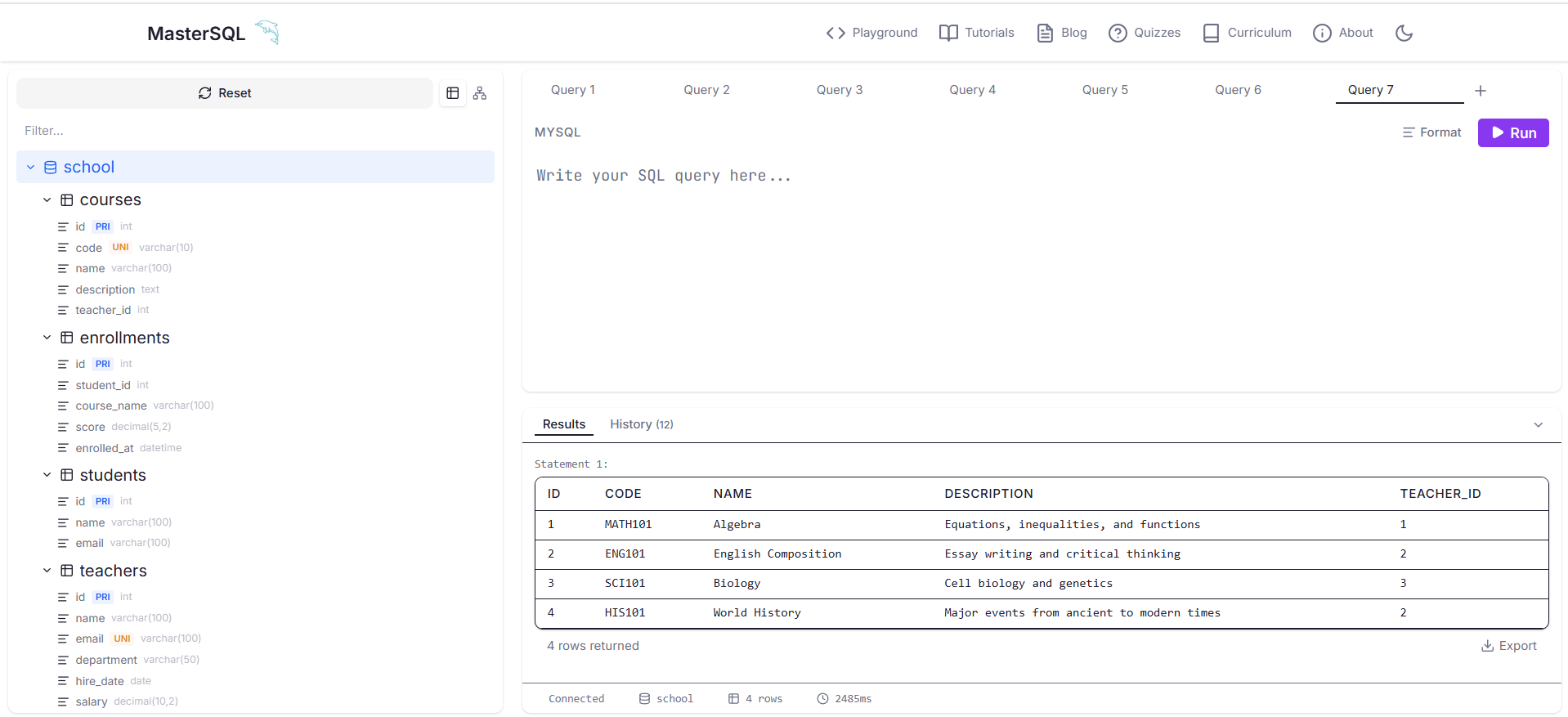
The playground is a full-featured SQL editor where you can write and execute any MySQL query. It includes:
- Multiple database support. Create and switch between databases just like you would in a real MySQL session.
- Result tables. Query results render as formatted tables with column headers and row data.
- Error messages. When a query fails, you get the actual MySQL error message, not a generic "something went wrong."
- Schema visualization. See your table structures and relationships as an Entity Relationship Diagram (ERD) rendered in real time.
- Query history. Review your previous queries and results within the same session.
The playground is not just for beginners. Experienced developers use it to test query logic, prototype schema designs, and verify MySQL behavior without touching their production databases.
A Quiz System
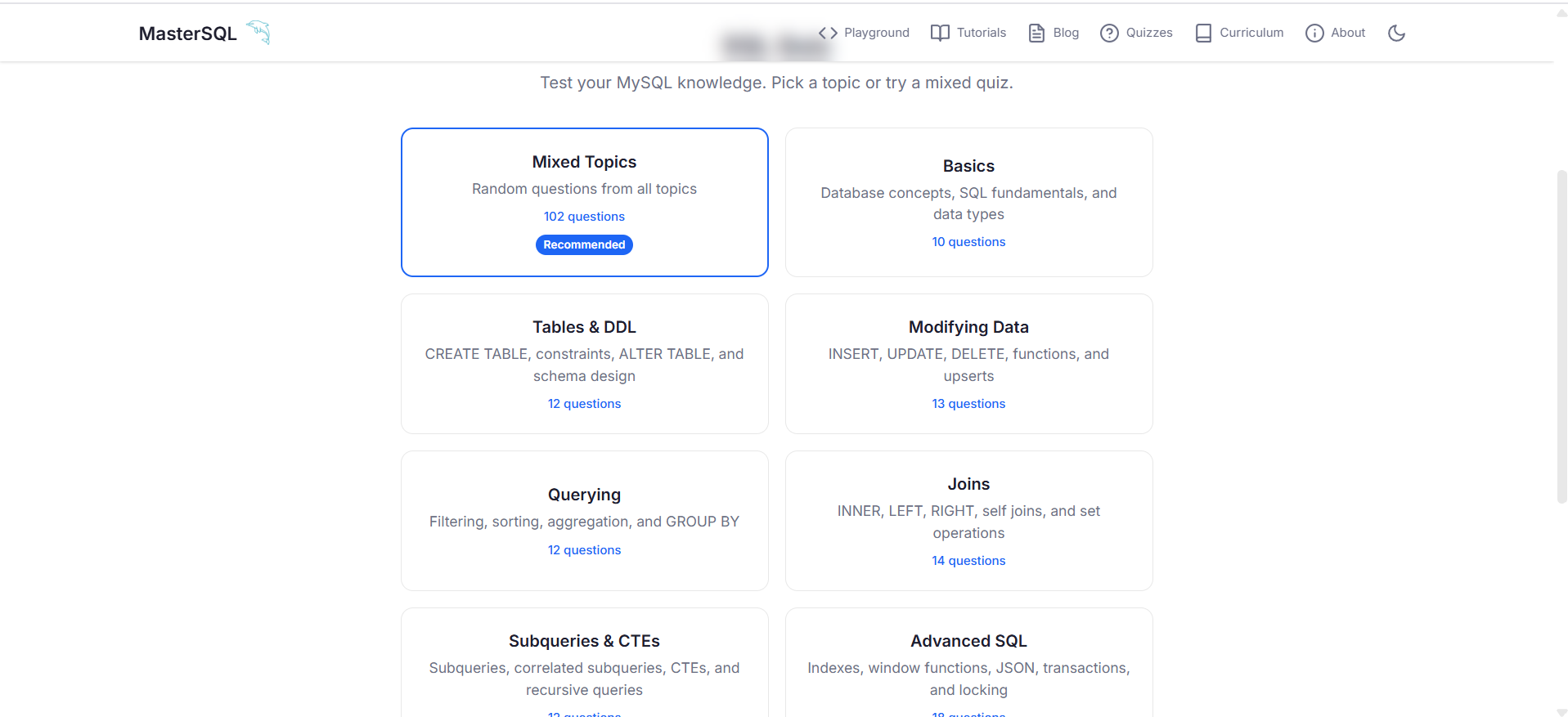
MasterSQL includes 102 quiz questions across 8 topics, with 10 questions per topic. Each quiz tests your understanding of a specific area: data types, JOINs, indexing, normalization, subqueries, aggregate functions, DDL operations, and query optimization.
The quizzes are not trivia. They test practical knowledge that directly applies to writing real queries. After completing a topic's tutorial and taking the corresponding quiz, you will know whether you actually understood the material or just read through it.
ERD Visualization
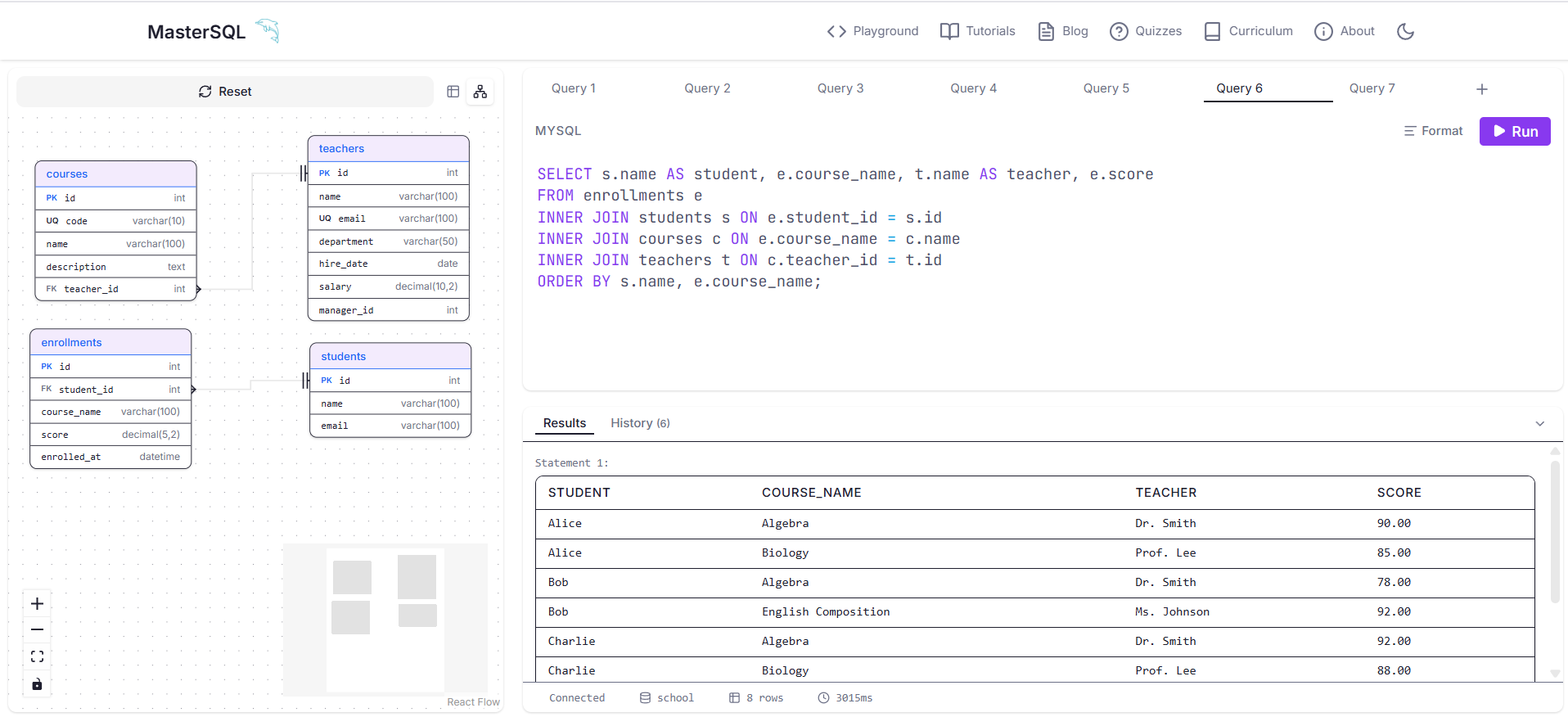
The built-in ERD tool lets you visualize your database schema as a Crow's Foot diagram. It shows tables, columns, primary keys, foreign keys, and relationships with proper cardinality notation. This is the same notation used in professional database design tools.
When you are building a schema in the playground, the ERD updates automatically. You can see your tables grow, your relationships form, and your design take shape in real time. For learners, this visual feedback makes abstract concepts like "foreign key relationships" concrete and tangible.
How MasterSQL Helps Learners
If you are learning SQL for the first time, MasterSQL removes the two biggest barriers to getting started: installation and environment setup. Most MySQL tutorials begin with instructions for downloading MySQL, creating a user, configuring permissions, and connecting a client. That process can take an hour before you write a single query. MasterSQL lets you skip all of that and start learning immediately.
If you are preparing for a technical interview, MasterSQL gives you a place to practice the specific types of queries that come up in interviews. JOINs, subqueries, GROUP BY with HAVING, window functions, and query optimization are all covered in the tutorial system and can be practiced freely in the playground.
If you are an intermediate developer looking to fill gaps in your knowledge, the quiz system helps you identify what you do not know. Many developers can write basic queries but struggle with topics like normalization, indexing strategies, or advanced JOIN behavior. The quizzes surface these gaps so you can focus your study time where it matters.
How MasterSQL Helps Educators
Teaching SQL often means managing a classroom full of students who all need database access. Setting up individual MySQL accounts, managing permissions, and dealing with version differences across operating systems takes time away from actual instruction.
MasterSQL eliminates this overhead. Every student opens the same URL and gets the same MySQL 8.4 environment. There are no accounts to create, no passwords to reset, and no installation support tickets. Students can follow the tutorials at their own pace, and you can assign specific quiz topics to assess understanding.
The per-session isolation also means students start each class period with a clean environment. One student's dropped table does not affect another student's work. This makes classroom management significantly simpler.
For curriculum planning, the 23-stage tutorial system provides a ready-made syllabus that covers foundational through advanced topics in a logical progression. You can supplement it with your own exercises or use it as-is for a complete course.
What You Can Practice
MasterSQL supports the full range of MySQL features that matter for learning and professional development:
- DDL: CREATE DATABASE, CREATE TABLE, ALTER TABLE, DROP TABLE, CREATE INDEX
- DML: INSERT, UPDATE, DELETE, REPLACE, LOAD DATA concepts
- Queries: SELECT, WHERE, ORDER BY, GROUP BY, HAVING, LIMIT, DISTINCT
- JOINs: INNER JOIN, LEFT JOIN, RIGHT JOIN, CROSS JOIN, self-joins
- Subqueries: Correlated subqueries, IN, EXISTS, derived tables
- Aggregates: COUNT, SUM, AVG, MIN, MAX, GROUP_CONCAT
- Views: CREATE VIEW, querying views, view limitations
- Stored Procedures: CREATE PROCEDURE, CALL, parameters, variables
- Triggers: CREATE TRIGGER, BEFORE/AFTER events, NEW and OLD references
- Optimization: EXPLAIN, SHOW CREATE TABLE, SHOW INDEX, query analysis
- Transactions: BEGIN, COMMIT, ROLLBACK, transaction isolation behavior
- Data Types: INT, VARCHAR, TEXT, DATE, DATETIME, ENUM, DECIMAL, and type selection guidance
If a feature exists in MySQL 8.4, you can practice it on MasterSQL.
Getting Started
Open mastersql.sedihub.com (https://mastersql.sedihub.com) in your browser. No account is required.
If you are new to SQL, start with Tutorial 1 from the sidebar. The tutorials guide you step by step from basic queries through advanced topics. If you already know SQL basics, jump straight to the playground and start writing queries. If you want to test your knowledge, pick a quiz topic from the quizzes page.
Each session lasts as long as you need it. Close the tab when you are done, and your next visit starts fresh.
Key Takeaways
- MasterSQL is a free, browser-based MySQL 8.4 practice environment with no signup required.
- The 23-stage tutorial system teaches SQL from fundamentals to advanced topics using a single school database project.
- The playground supports full MySQL syntax including stored procedures, triggers, EXPLAIN, and multi-statement queries.
- The quiz system covers 102 questions across 8 topics to test practical knowledge.
- ERD visualization makes schema design concrete and visual.
- Per-session isolation means every practice session starts clean, which benefits both individual learners and classroom environments.
- Educators can use the structured curriculum as a ready-made syllabus without needing to set up MySQL for each student.
Frequently Asked Questions
Is MasterSQL really free?
Yes. MasterSQL is completely free to use. There are no premium tiers, no usage limits, and no accounts required. The platform is supported by advertising and is designed to be accessible to anyone with a browser and an internet connection.
What version of MySQL does MasterSQL use?
MasterSQL runs MySQL 8.4, the latest long-term support release. The syntax and behavior you learn on MasterSQL matches what you will encounter in production MySQL environments.
Can I use MasterSQL on my phone or tablet?
MasterSQL works on any device with a modern browser. The interface is responsive and adapts to different screen sizes. The query editor and results tables are usable on mobile, though a keyboard makes typing queries significantly easier.
How does MasterSQL handle session data?
Each session is completely isolated. When you open MasterSQL, you get a fresh MySQL environment. Your queries, tables, and data are not visible to other users, and they are not saved after your session ends. This design ensures privacy and a consistent starting point for every user.
Can educators use MasterSQL in their courses?
Yes. MasterSQL's per-session isolation and structured tutorial system make it well-suited for classroom use. Students do not need to install software or create accounts. The 23-stage tutorial progression provides a complete curriculum from basics to advanced topics, and the quiz system gives educators a way to assess student understanding.
Does MasterSQL support multi-statement queries?
Yes. You can run multiple SQL statements separated by semicolons in a single execution. Each statement runs in sequence, and all results are displayed. This supports real-world workflow patterns where you might create a table, insert data, and query it in one go.